Building with AI · October 7, 2026
A whiteboard that disappears while I teach, built with an AI pair
I record technical explanation videos. The diagrams are made carefully in Figma; what was missing was the explaining part: a surface where a finished diagram can be walked through on camera, one idea at a time, in a way that looks deliberate rather than improvised.
Every whiteboard I tried was built for drawing and collaborating, and on video that gets in the way. Too much interface ends up on screen. There's no notion of a teaching state (clean diagram, then the engine highlighted, then the engine annotated), so going back means undoing. Clearing annotations risks the diagram underneath. And nothing tells the viewer where to look.
So I built my own: JW Canvas, a personal explanation console rather than a collaboration tool. It runs in the browser on tldraw, lives on a Cloudflare Worker behind a sign-in, and keeps my boards in private storage. I built it over five days, 3 to 7 October, in conversation with Claude (Claude Code): 165 commits, 310 automated tests, deployed only when I said so.
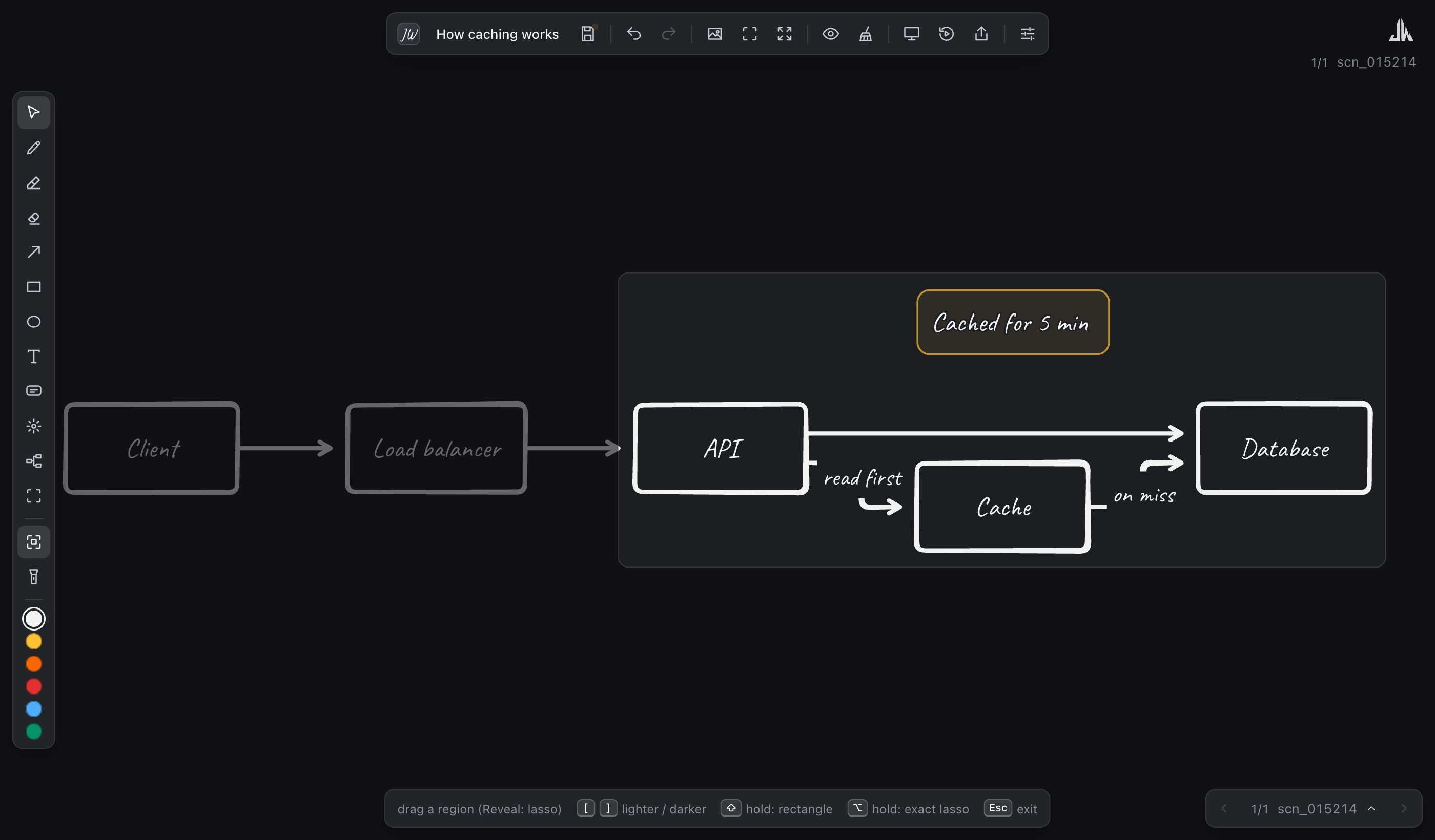
Focus: everything outside the part I'm talking about dims.
How this evolved
Day 1: a teaching whiteboard (3 Oct). Straight from a one-page brief: tldraw with its own interface hidden behind small dark panels. The imported diagram is a background that Clear, Hide and Replace never touch. Scenes each hold their own annotations and camera, so "duplicate the scene, add the next step" becomes a step-by-step explanation. Focus dims everything but one region; Reveal starts dark and lights parts up one at a time. Annotations are in a handwriting font, and every tool has its own cursor, so it's always clear on video what's active.
Day 2: mind maps, and going online privately (4 Oct). A keyboard-driven mind map (Tab for a child, Enter for a sibling) that stays tidy, with a markmap-style look and an outline you can type. When I asked for "a passcode", the advice was not to build one: a PIN checked inside a web app is easy to bypass. Instead the app sits behind Cloudflare Access, and the page doesn't load at all for anyone else. Then boards moved to the cloud.
Day 3: frames, scenes, and a lost scene (5 Oct). Frames became named camera stops to jump between while teaching. Then I lost a scene of a board to a one-click Clear followed by a scene switch, which also clears undo. Claude reviewed every path that saves, syncs, loads or deletes, and fixed them in order: version history, Clear and delete asking first with an Undo, and an emergency copy when the tab closes. The same day, every shortcut was reviewed into one model: letters pick tools, ⇧ thinks bigger, ⌥ is the smarter version, ⌘ is only for standard commands.
Day 3, evening: the build replay. Press ⇧B and the scene redraws itself in the order it was made: boxes appear, lines trace themselves, text types out letter by letter, and the camera tours the scene stop by stop. In step mode it pauses after each burst, so I can talk over it.
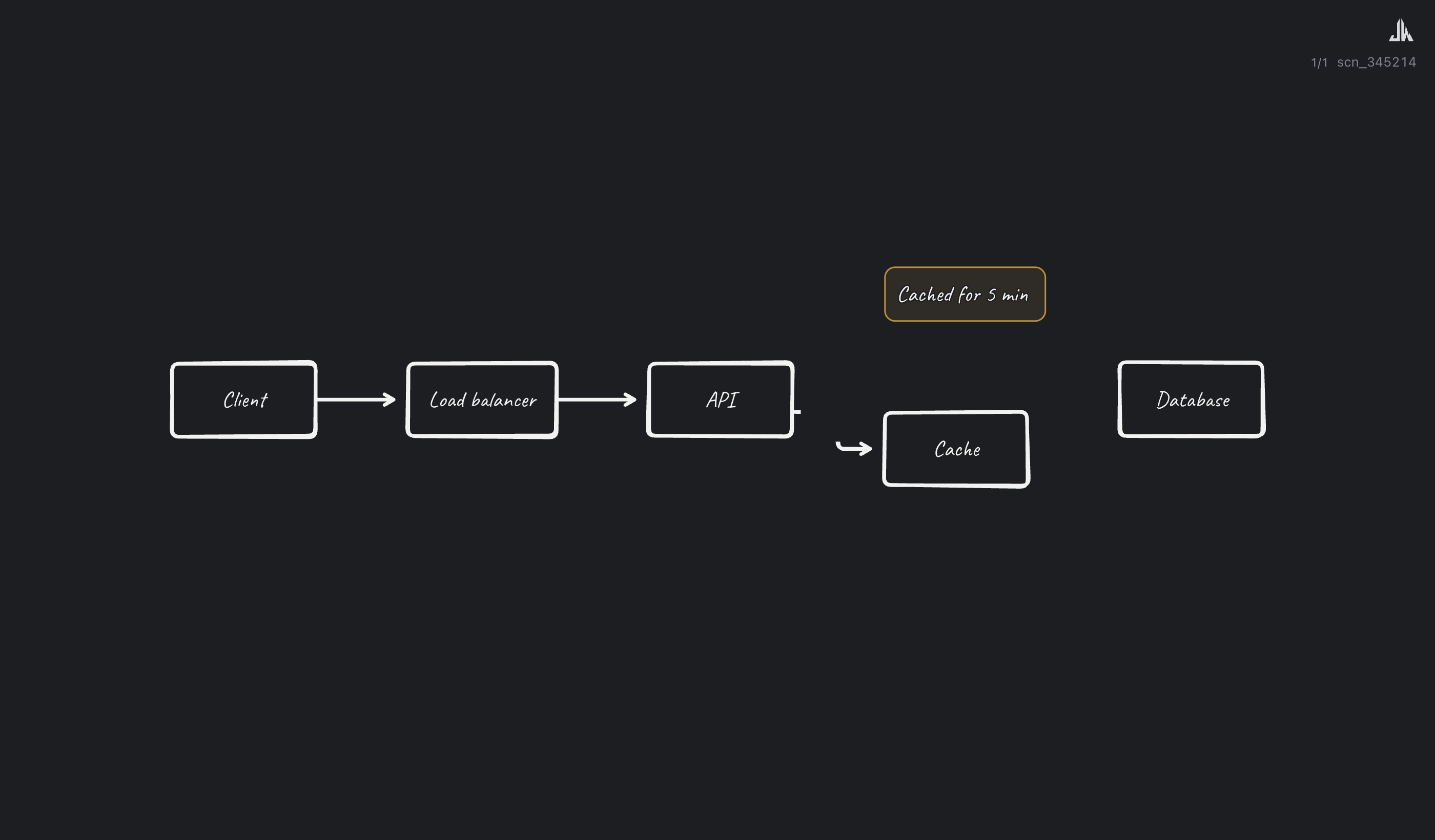
The replay, halfway through redrawing a diagram.
Days 4 and 5: from text to diagram, both ways (6 and 7 Oct). Folders
and palettes, view-only share links, and then the part I'm happiest with:
type User -> API -> Cache (or paste a Mermaid flowchart or sequence
diagram) and the diagram draws itself as you type. It works the other way
too: select a diagram and edit it as text.
Then I wanted to type my thinking and get a diagram. The obvious answer was to put an AI model behind the app. We tested the alternatives on my own sentences first, side by side: spaCy, and grammar rules in the browser. Both read my sentences almost identically, and every misreading was fixed by a small rule. So Describe works without AI: a grammar library tells nouns from verbs, and a plain list of phrases I can extend says what counts as narration ("I need to"), "next" ("then", "finally") or "at the same time" ("as I do both").
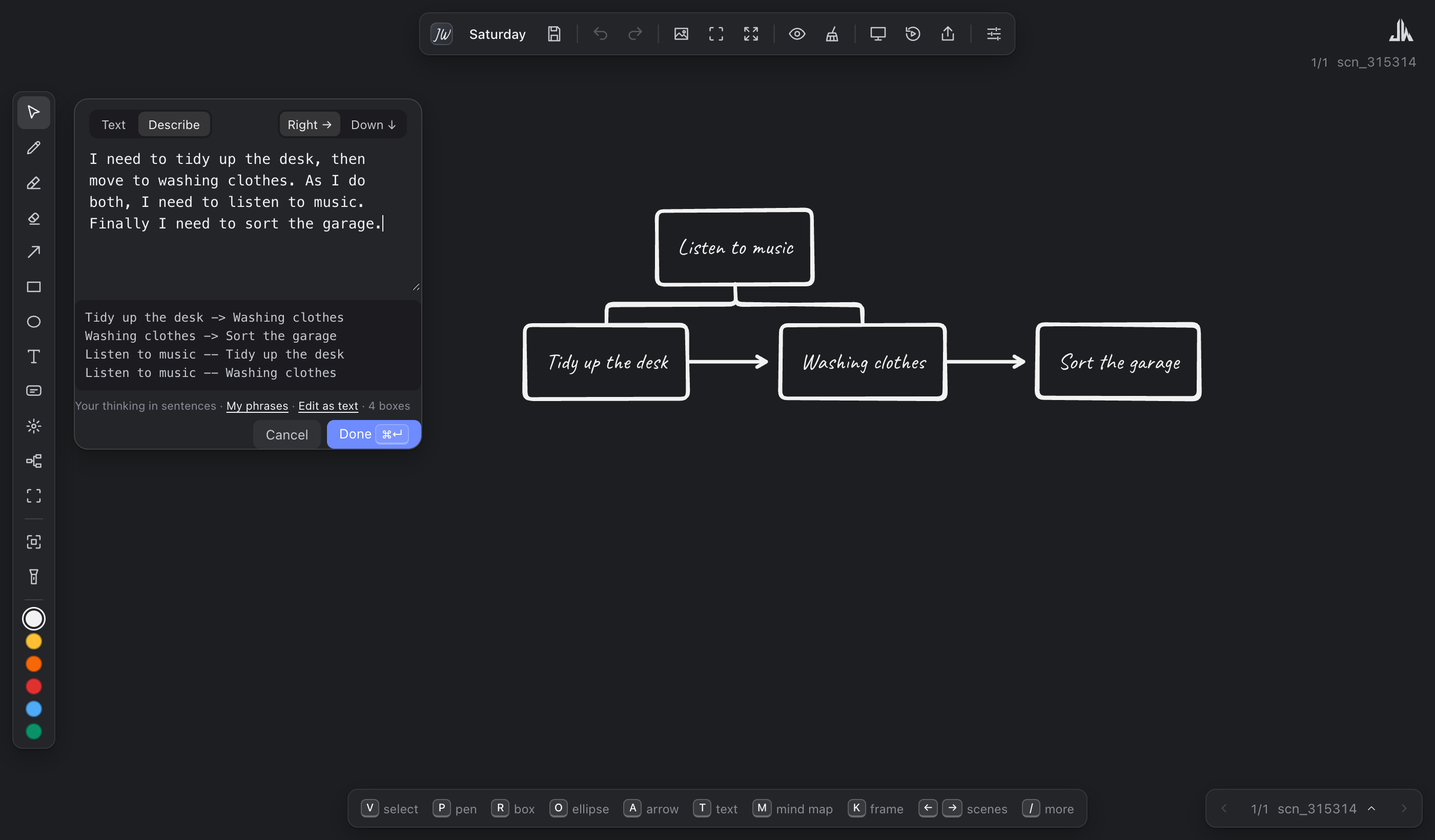
Describe: sentences in, diagram out, with the text it made in between.
Real diagrams made this way got messy, so the last additions were about lines: lines that go round (over the top or underneath) instead of cutting through boxes, and a one-click Tidy that lays a diagram out and cleans its lines.
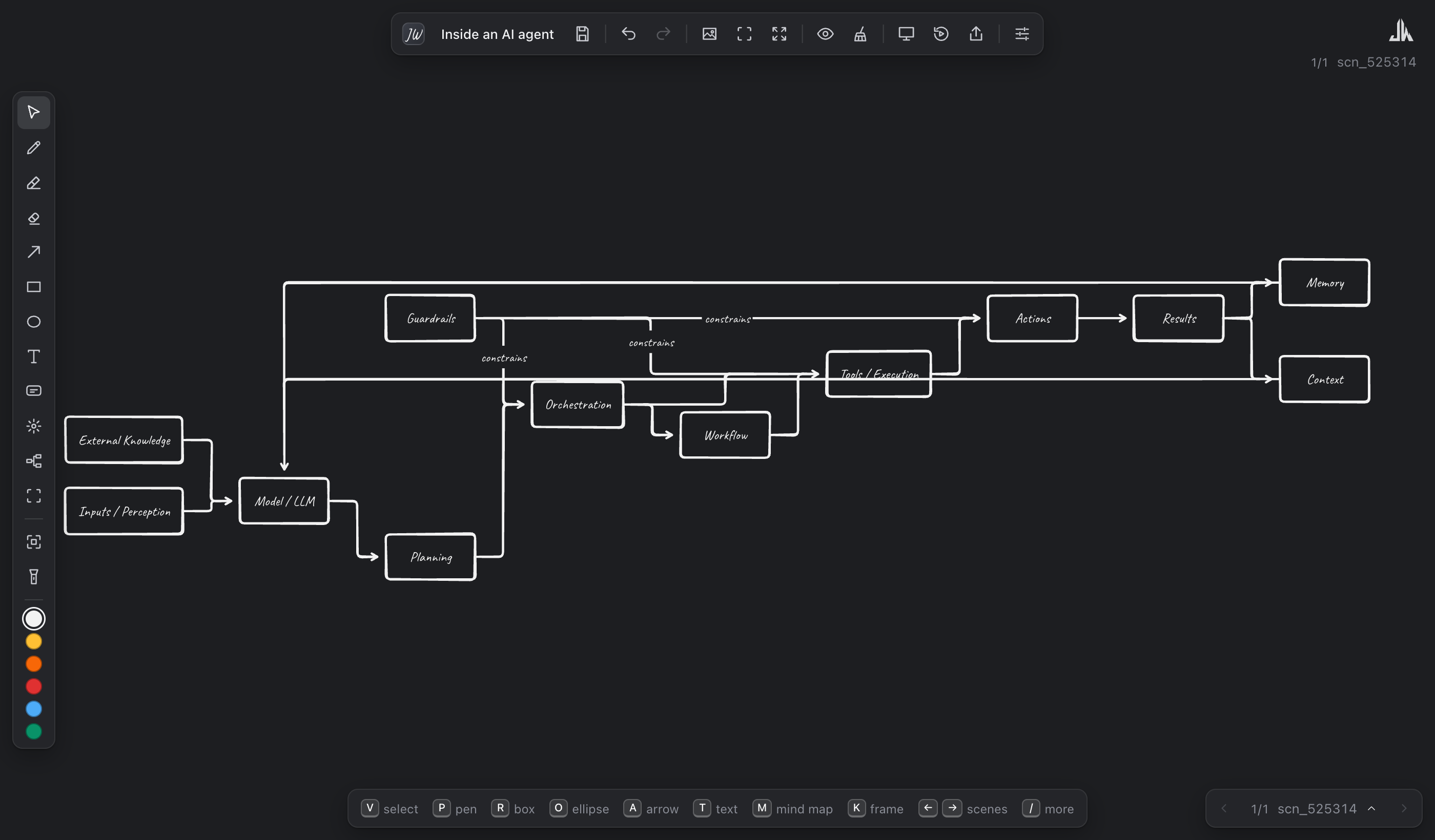
Before and after one click of Tidy.
Building it with an AI pair
The rhythm hardly changed in five days. I'd describe what I wanted, usually in a sentence. Claude would come back with a short proposal, often an ASCII sketch and one or two choices. I'd say "go for it", and it would build, test in a browser, commit and push. Deploying was always a separate step that only I could trigger.
A few things made that work:
- Tests as the shared memory. Every bug I reported became a test before it was fixed: "takes a box back when its line is removed and then put back", "the narration phrases never touch sort the garage". 310 of them now run before every deploy.
- Showing, not asserting. Claude checked its work in a browser on a separate test server and showed me screenshots, never my real boards. More than once the screenshot caught what the tests had missed.
- Pushing back. No passcode inside the app. No AI backend when grammar rules were enough. No Electron wrapper.
- Owning mistakes plainly. One afternoon it pushed a commit with a failing test, said so, and fixed it in the next commit.
The day we asked "are we overcomplicating this?"
Late on day 5 I asked for an honest take on the app. The answer: the biggest risk was no longer bugs, it was drift. In one day we'd added sequence diagrams, Describe, lines that go round and Tidy: diagram-editor territory, a race a personal teaching tool can't win and doesn't need to.
And there were now several kinds of "connected boxes", each with its own hidden rules. We cut them down to three, with one rule each:
- Mind map = structure: always tidy; you shape it with keys and its outline.
- Boxes = drawing: they stay where you put them; Tidy lays them out when you ask.
- Sequence diagram = text: drawn from its text; edit the text to change it.
That simplification is the change I'm proudest of from the whole week, and it came from asking the question, not from adding anything.
What's next is the unglamorous part: record real videos with it, see what gets in the way, and only then decide what to build.